
Showing posts with label Pc Solutions. Show all posts
Friday, 22 November 2013
How to increase Downloading Speed of Internet download Manager (IDM)


Most of us using Internet download manager (IDM) for downloading any file like videos, mp3, PDF file or any important files because of the simplicity to use it , also having perfect and consistent downloading speed.You can increase internet downloading speed more by just changing some settings from the IDM options.Before sharing this small trick let me clear that i know most of you know this trick but i am still sharing this trick because may some of my friends may unknown to this.
If you don't have registered internet download manager or having a idm fake serial key problem, kindly check my previous post regarding solving the idm problem,you can solve it manually through this article i.e Solution of Fake Serial Number Problem in IDM. or you can apply idm patch by following instructions mention in this article Another Solution of IDM Fake Serial Key Problem in IDM.
Solution
of Fake Serial Number problem in IDM (internet download manager). - See
more at:
http://riskyplayer.blogspot.com/2012/08/solution-to-fake-serial-number-problem.html#sthash.0GcrjPab.dpuf
Solution
of Fake Serial Number problem in IDM (internet download manager). - See
more at:
http://riskyplayer.blogspot.com/2012/08/solution-to-fake-serial-number-problem.html#sthash.0GcrjPab.dpuf
Solution
Of Fake Serial Number problem in IDM (internet download manager). - See
more at:
http://riskyplayer.blogspot.com/2012/08/solution-to-fake-serial-number-problem.html#sthash.0GcrjPab.dpuf
Solution
Of Fake Serial Number problem in IDM (internet download manager). - See
more at:
http://riskyplayer.blogspot.com/2012/08/solution-to-fake-serial-number-problem.html#sthash.0GcrjPab.dpuf
Solution
Of Fake Serial Number problem in IDM (internet download manager). - See
more at:
http://riskyplayer.blogspot.com/2012/08/solution-to-fake-serial-number-problem.html#sthash.0GcrjPab.dpuf
Solution
Of Fake Serial Number problem in IDM (internet download manager). - See
more at:
http://riskyplayer.blogspot.com/2012/08/solution-to-fake-serial-number-problem.html#sthash.0GcrjPab.dpuf
Solution
Of Fake Serial Number problem in IDM (internet download manager). - See
more at:
http://riskyplayer.blogspot.com/2012/08/solution-to-fake-serial-number-problem.html#sthash.0GcrjPab.dpuf
Solution
Of Fake Serial Number problem in IDM (internet download manager). - See
more at:
http://riskyplayer.blogspot.com/2012/08/solution-to-fake-serial-number-problem.html#sthash.0GcrjPab.dpuf
How to speed up the IDM?
It's very simple to increase your idm donwloading speed,just follow the easy steps.1. Open the IDM "options" by clicking on "download" button.
2. Click the Connection tab, then on the connection type,select LAN 10Mbs (check screenshot)

3.No change "Max.connection number" and select number 16. (see screen shot)

That's it.Now the download speed of your internet download manger will be more faster than before because onwards idm will split the file you downloading into 16 parts of the default value (which was only 8 ) , as because of more fragments of file, the download will become lighter loading time and automatic downloading becomes super fast.
Note : This method does not apply when you download via the web server ziddu and 4shared.
I will also share one another post that will be " how to accelerate IDM with IDM OPTIMIZER"
Kindly share your views and give your feedback regarding my this small tip and also share it with others to spread knowledge.
Tuesday, 8 October 2013
How to Activate Windows 7 | Register Windows 7 using Remove WAT Tool
As Microsoft published new generation windows 8, but most of
the people still stuck in the windows 7. Being a blogger I received several
emails from my friends, and they ask me to write a post on how to activate
windows 7 (pirated windows) or how to crack it etc, before starting the tutorial,
let me share something important about the usage of windows 7, you must
activate Windows inside 30 days of activate. Activation helps to check that
Windows on your computer is genuine and hasn't been utilized on a more number
of computers than the Microsoft Software License Terms permit. Thus,
activation helps prevent software counterfeiting.

Before staring let me tell you that there are various ways of activating the windows 7, like using activator on the trail version of installed windows 7.
There are some “iso setups” on torrents sites which are Pre-activated; you don’t have to use any type of crack or patch. (I will write another post on those ways.)
So, in this post, i want to show you how to activate windows
using “remove wat tool” because it’s very easy...
I am going to write step by step so you have to follow all of them very carefully.
I am going to write step by step so you have to follow all of them very carefully.
1. First of all download "Remove WAT" (click on below download button),

3. After downloading the file, extract it using zip extractor software like Winrar / Win-zip or 7 zip, if you don’t have, download any one of them and install it, for extracting downloaded file.
4. Remember you also have to uninstall “KB971033” WAT update.
Its windows activation technology which helps to detect whether the installed windows is pirated or original windows.
Follow the below pictures to uninstall it.
a) - Go to start>control panel, as you can see the option top right screen, choose view by LARGE

b)- Then scroll down the screen, find Windows Update, the
last 1..and open it..


d) - To uninstall your update, click on 'Installed
Updates' on the top of the screen..

e) -Scroll down your windows and find the title
'Microsoft Windows’, under that title, find your “KB971033” and right click ,uninstall
it..
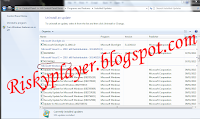
f) -To prevent the windows install WAT again, easy thing
is, do not update your windows but if you want your windows updated then go
back here again, and 'Check for updates'
KB971033 will show ready to update, usually it will show at
important updates.
Click on important updates, right click on “KB971033” and
hide updates.

That’s done for WAT !!
5. Now open the file you just downloaded and run it as administrator
(right click and select run as administrator).
Remove WAT tools will be open (as shown in the picture).
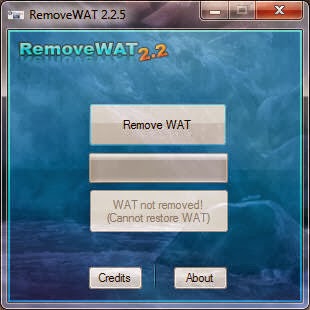
6. Click on 'Remove WAT' and wait for it to work.. it will
auto restart your Pc , don’t need to
worry about it, restart is must to apply changes.
7. After restart, right click on “My computer” icon and select
“Properties”, if there is no stated windows activation at the bottom of your
screen, your activation is done.
HAVE FUN!!!!!
Please let me about
this article, give your opinion, if you have any difficulty in this ask me.
Also share it with your other friends.
Thursday, 3 October 2013
Another Solution Of IDM Fake Serial Key problem in Internet Download Manager
I already written a post on “Solution Of IDM Fake Serial Number” it’s working fine (as I used it on my own PC)
but some of the people face some difficulties to solve their problem, most of
them texts me allot of time to find some other easy solution for them. So today
I am going to share another solution for IDM Fake Serial key, that works properly on latest windows versions like windows 7 and also on windows 8.
There..... I assume that you already install a fresh Internet Download manager (if not then do it first). In this moment I am going to discuss about How to Solve "IDM FAKE SERIAL NUMBER" problem. As because of the high demand and most popular Download manager IDM has been increasing their security, so the patch that you often use may not work anymore.
Steps to be Followed Carefully
There..... I assume that you already install a fresh Internet Download manager (if not then do it first). In this moment I am going to discuss about How to Solve "IDM FAKE SERIAL NUMBER" problem. As because of the high demand and most popular Download manager IDM has been increasing their security, so the patch that you often use may not work anymore.
Steps to be Followed Carefully
Hey, we don't need to reinstall the program (IDM), just
follow below steps and you'll solve Fake Serial Number Problem of IDM:
1) First of all Download this File (click to download)
Which is the actual key for the solution of IDM Fake serial Number.
2) Don’t Forget to Close/Quit Internet Download Manager (quit from system tray also)
3) open the file which you downloaded,
1) First of all Download this File (click to download)
Which is the actual key for the solution of IDM Fake serial Number.
2) Don’t Forget to Close/Quit Internet Download Manager (quit from system tray also)
3) open the file which you downloaded,
a)- Click on PATCH SERVER CHECK
 |
| idm fake serial key_screenshot 1 |
b)-
Select “idm” icon where it is installed as shown
in the screenshot and then click on open.
 |
| idm fake serial key_screenshot 2 |
 |
| idm fake serial key_screenshot 3 |
4) Copy the serial number.
5) Open IDM, go to Registration Tab and register with your own name and email address.
6) And you’re done but remember after doing these all steps DO NOT UPDATE idm, if you do you will face the same problem again.
Well at last I am saying that please let me know about your
opinion about my post, comment about this post. Please share it on social media
to solve your friends’ problem also.
Sunday, 9 June 2013
How to make bootable usb for windows 7| windows 8| bootable usb | Flash Drive | USB Drives
Before I tell you straight about how to make
bootable USB/Flash drive, I want to share some problems that why we need
bootable USB/Flash drive to install Microsoft any latest operating system, because
now a days a trend to save time and money is popular, if you have original windows CD/DVD
and that is now not working properly, now instead of purchasing new windows CD/DVD for
installing windows you can take advantage of making you USB/Flash drive
bootable with ease of steps to save your money.
So
now i am going to tell you how to make a bootable USB/flash drive
of windows 7 and windows 8 using a software called WiNToBootic.


Using WiNToBootic you can make a bootable USB/flash drive in the easiest way ever, because you have to download this free small software only then extract it and you are a step behind of having bootable USB/flash drive. Another advantage is there no need to install WiNTBootic it’s a standalone program.
About WiNToBootic
It is a freeware that allows bootable Windows USB hard or flash disk from an ISO image, CD/DVD or Folder. As I concern with bootable ISO you can also make bootable memory card of your mobile phone,
SIMPLE
STEPS FOR BOOTABLE USB/Flash Drive:
Note:
System Requirements for this software are you have
to be at least:
- Windows XP or later (32-bit/64-bit)
- .NET Framework 2.0 ===>>> Download it from Here
- Admin Rights for using software.
Use
any compression software like Win Zip or 7zip to unzip file and then double
click on WiNToBootic.exe to execute it.
==>>Then select the drive letter of the USB/flash drive.
==>>Select Quick Format (to format your USB/flash Drive)
==>>Drag & Drop or select via Open Dialog an ISO/DVD/Folder
which contains bootable Windows ISO image.
==>> Then at the bottom Click on "Do it!" to it
button.

In few minutes the ISO image will be processed and converted
to make USB/Flash drive bootable and you will see a below box.

Now your USB/flash drive has been made bootable, now you can
install windows in your every system which supports bootable USB function.
Thanks for reading my post I hope it will help you allot,
you can give me your feedbacks through comments regarding this post or any
other posts in my blog.
Let me know if you have any problem.
Please you can also give me positive suggestions so I improve my posting and my blog.
Please you can also give me positive suggestions so I improve my posting and my blog.
Keep reading my posts.
Thursday, 9 August 2012
Solution Of Fake Serial Number problem in IDM (internet download manager).
Free Solution of Fake Serial Number problem in IDM (internet download manager).
 If We have IDM When We run the application its open a window with
the problem of "fake serial number" then We Should not Rush to
re-install and idm think That We Can no longer be used. Ensure That the
IDM is already in the update to the latest version and have installed on
your computer.
If We have IDM When We run the application its open a window with
the problem of "fake serial number" then We Should not Rush to
re-install and idm think That We Can no longer be used. Ensure That the
IDM is already in the update to the latest version and have installed on
your computer.Here is the method how to solve it:
1.
Exit IDM from the taskbar before entering the serial.
2. Disconnect active connections to the internet.
2. Disconnect active connections to the internet.
3. Open the C: \ WINDOWS \ system32 \ drivers \ etc and locate the file 'hosts'.
4. Then right click and open with notepad. If you can not open with notepad or maybe We Are not Able to edit it, then There is a little trick to edit it,first cut "host" file ,paste it at any place e.g on desktop,then right click and select "open with notepad" to edit it,
5. Once open please copy the below text and paste it at bottom of all text below the "127.0.0.1 local host:",remember do not replace the old text just paste below text their...
127.0.0.1 tonec.com
127.0.0.1 www.tonec.com
127.0.0.1 registeridm.com
127.0.0.1 www.registeridm.com
127.0.0.1 secure.registeridm.com
127.0.0.1 secure.internetdownloadmanager.com
127.0.0.1 mirror.internetdownloadmanager.com
127.0.0.1 mirror2.internetdownloadmanager.com
127.0.0.1 www.internetdownloadmanager.com
6. When finished, do not forget to save (Ctrl+S), then again cut your "host"file and paste it again ,to its previous location that is(C: \ WINDOWS \ system32 \ drivers \ etc).
Open IDM, (go to start menu, internet download
manager).
7. IDM registration tab will b open just put any below key , to better fill the serial number first.
7. IDM registration tab will b open just put any below key , to better fill the serial number first.
To be content with the serial number is (choose one):
2P4OX-613CB-RDOWV-H1BDE
3J5U-8U66N-D0B9M-54SLM
EC0Q6-QN7UH-5S3JB-YZMEK
GZLJY-X50S3-0S20D-NFRF9.
8. So "fake serial number problem" will be resolve itself and IDM is ready for reuse....
I hope it will work for you,Please let me know about your opinion and also share it on social media to help others.
UPDATE:
As most of the people have confused and have difficulty in the above steps, and unable to solve their idm problem. So check my new post Another Solution Of IDM Fake Serial Key Problem In Internet Download Manager , it will be more easy to solve your problem.
Another
Solution Of IDM Fake Serial Key problem in Internet Download Manager -
See more at:
http://riskyplayer.blogspot.com/2013/10/another-solution-of-idm-fake-serial-key.html#sthash.cmkNWjAe.dpuf
Subscribe to:
Posts (Atom)


 Posts
Posts


